bash
npm install cannon-esjavascript
import * as THREE from 'three';
import * as CANNON from 'cannon-es';

class PhysicsWorld {
  constructor() {
    // 创建物理世界
    this.world = new CANNON.World();
    this.world.gravity.set(0, -9.82, 0);
    this.world.broadphase = new CANNON.SAPBroadphase(this.world);

    // 存储 Three.js 和 Cannon.js 对象的映射
    this.objects = new Map();

    // 设置时间步长
    this.timeStep = 1 / 60;
  }

  // 创建立方体物理体
  createBox(mesh, mass = 1, material = null) {
    const size = mesh.geometry.parameters ||
                 new THREE.Vector3().fromArray(mesh.geometry.attributes.position.array);

    const shape = new CANNON.Box(new CANNON.Vec3(
      size.width / 2 || 1,
      size.height / 2 || 1,
      size.depth / 2 || 1
    ));

    const body = new CANNON.Body({
      mass,
      shape,
      material: material || new CANNON.Material()
    });

    body.position.copy(mesh.position);
    body.quaternion.copy(mesh.quaternion);

    this.world.addBody(body);
    this.objects.set(mesh.uuid, { mesh, body });

    return body;
  }

  // 创建球体物理体
  createSphere(mesh, mass = 1) {
    const radius = mesh.geometry.parameters.radius;
    const shape = new CANNON.Sphere(radius);

    const body = new CANNON.Body({
      mass,
      shape,
      material: new CANNON.Material()
    });

    body.position.copy(mesh.position);
    this.world.addBody(body);
    this.objects.set(mesh.uuid, { mesh, body });

    return body;
  }

  // 创建地面
  createGround(mesh) {
    const body = new CANNON.Body({
      mass: 0, // 质量为 0 表示静态物体
      shape: new CANNON.Plane()
    });

    body.quaternion.setFromEuler(-Math.PI / 2, 0, 0); // 旋转为水平面
    this.world.addBody(body);
    this.objects.set(mesh.uuid, { mesh, body });

    return body;
  }

  // 更新物理世界并同步 Three.js 对象
  update() {
    this.world.step(this.timeStep);

    // 同步物理体和 Three.js 对象
    this.objects.forEach(({ mesh, body }) => {
      if (mesh && body) {
        mesh.position.copy(body.position);
        mesh.quaternion.copy(body.quaternion);
      }
    });
  }

  // 应用力
  applyForce(meshId, force, worldPoint) {
    const obj = this.objects.get(meshId);
    if (obj && obj.body) {
      obj.body.applyForce(force, worldPoint || obj.body.position);
    }
  }
}

// 使用示例
class Game {
  constructor() {
    this.scene = new THREE.Scene();
    this.camera = new THREE.PerspectiveCamera(75, window.innerWidth / window.innerHeight, 0.1, 1000);
    this.renderer = new THREE.WebGLRenderer();

    // 创建物理世界
    this.physicsWorld = new PhysicsWorld();

    this.init();
    this.animate();
  }

  init() {
    // 创建 Three.js 物体
    const boxGeometry = new THREE.BoxGeometry(1, 1, 1);
    const boxMaterial = new THREE.MeshStandardMaterial({ color: 0xff0000 });
    const boxMesh = new THREE.Mesh(boxGeometry, boxMaterial);
    boxMesh.position.set(0, 5, 0);
    this.scene.add(boxMesh);

    // 创建对应的物理体
    this.physicsWorld.createBox(boxMesh, 1);

    // 创建地面
    const groundGeometry = new THREE.PlaneGeometry(10, 10);
    const groundMaterial = new THREE.MeshStandardMaterial({ color: 0x888888 });
    const groundMesh = new THREE.Mesh(groundGeometry, groundMaterial);
    groundMesh.rotation.x = -Math.PI / 2;
    this.scene.add(groundMesh);

    this.physicsWorld.createGround(groundMesh);
  }

  animate() {
    requestAnimationFrame(() => this.animate());

    // 更新物理世界
    this.physicsWorld.update();

    this.renderer.render(this.scene, this.camera);
  }
}javascript
// 下载 ammo.wasm 或使用 CDN
// 下载路径[已经预构建的](https://github.com/kripken/ammo.js/blob/main/builds/ammo.js)
// 初始化 Ammo.js
async function initAmmo() {
  return new Promise((resolve) => {
    Ammo().then(resolve);
  });
}

class AmmoPhysicsWorld {
  constructor() {
    this.rigidBodies = [];
    this.transformAux1 = new Ammo.btTransform();
  }

  async init() {
    this.ammo = await initAmmo();

    // 创建物理世界
    const collisionConfiguration = new this.ammo.btDefaultCollisionConfiguration();
    const dispatcher = new this.ammo.btCollisionDispatcher(collisionConfiguration);
    const overlappingPairCache = new this.ammo.btDbvtBroadphase();
    const solver = new this.ammo.btSequentialImpulseConstraintSolver();

    this.world = new this.ammo.btDiscreteDynamicsWorld(
      dispatcher,
      overlappingPairCache,
      solver,
      collisionConfiguration
    );

    this.world.setGravity(new this.ammo.btVector3(0, -9.8, 0));
  }

  // 创建立方体物理体
  createRigidBody(threeObject, physicsShape, mass, pos, quat) {
    const transform = new this.ammo.btTransform();
    transform.setIdentity();
    transform.setOrigin(new this.ammo.btVector3(pos.x, pos.y, pos.z));
    transform.setRotation(new this.ammo.btQuaternion(quat.x, quat.y, quat.z, quat.w));

    const motionState = new this.ammo.btDefaultMotionState(transform);
    const localInertia = new this.ammo.btVector3(0, 0, 0);

    if (mass > 0) {
      physicsShape.calculateLocalInertia(mass, localInertia);
    }

    const rbInfo = new this.ammo.btRigidBodyConstructionInfo(
      mass,
      motionState,
      physicsShape,
      localInertia
    );

    const body = new this.ammo.btRigidBody(rbInfo);

    if (mass > 0) {
      body.setActivationState(4); // DISABLE_DEACTIVATION
    }

    this.world.addRigidBody(body);

    // 存储关联
    threeObject.userData.physicsBody = body;
    this.rigidBodies.push(threeObject);

    return body;
  }

  update(deltaTime) {
    this.world.stepSimulation(deltaTime, 10);

    // 更新所有刚体的位置和旋转
    for (let i = 0; i < this.rigidBodies.length; i++) {
      const objThree = this.rigidBodies[i];
      const objAmmo = objThree.userData.physicsBody;

      if (objAmmo) {
        const motionState = objAmmo.getMotionState();
        if (motionState) {
          motionState.getWorldTransform(this.transformAux1);
          const p = this.transformAux1.getOrigin();
          const q = this.transformAux1.getRotation();

          objThree.position.set(p.x(), p.y(), p.z());
          objThree.quaternion.set(q.x(), q.y(), q.z(), q.w());
        }
      }
    }
  }
}javascript
// Cannon.js 约束示例
class PhysicsConstraints {
  constructor(world) {
    this.world = world;
  }

  createHingeConstraint(bodyA, bodyB, options) {
    const { pivotA, pivotB, axisA, axisB } = options;

    const constraint = new CANNON.HingeConstraint(
      bodyA, bodyB,
      pivotA, pivotB,
      axisA, axisB
    );

    this.world.addConstraint(constraint);
    return constraint;
  }

  createDistanceConstraint(bodyA, bodyB, distance) {
    const constraint = new CANNON.DistanceConstraint(
      bodyA, bodyB,
      distance
    );

    this.world.addConstraint(constraint);
    return constraint;
  }
}javascript
class CollisionSystem {
  constructor(world) {
    this.world = world;
    this.contactMaterial = new CANNON.ContactMaterial(
      new CANNON.Material('default'),
      new CANNON.Material('ground'),
      {
        friction: 0.5,
        restitution: 0.3
      }
    );

    this.world.addContactMaterial(this.contactMaterial);

    // 监听碰撞事件
    this.world.addEventListener('beginContact', (event) => {
      this.handleCollision(event.bodyA, event.bodyB);
    });
  }

  handleCollision(bodyA, bodyB) {
    console.log('碰撞发生在:', bodyA, '和', bodyB);

    // 可以触发游戏逻辑
    if (bodyA.userData && bodyA.userData.type === 'player') {
      this.handlePlayerCollision(bodyB);
    }
  }
}简化碰撞体:使用简单的几何体近似复杂模型
合理使用质量:静态物体质量设为0
批次更新:减少渲染和物理更新频率
休眠机制:启用自动休眠减少计算
javascript
// Cannon.js 启用休眠
world.allowSleep = true;

// Ammo.js 手动控制激活状态
body.setActivationState(4); // 禁用休眠简单项目/原型:使用 Cannon.js,开发快速
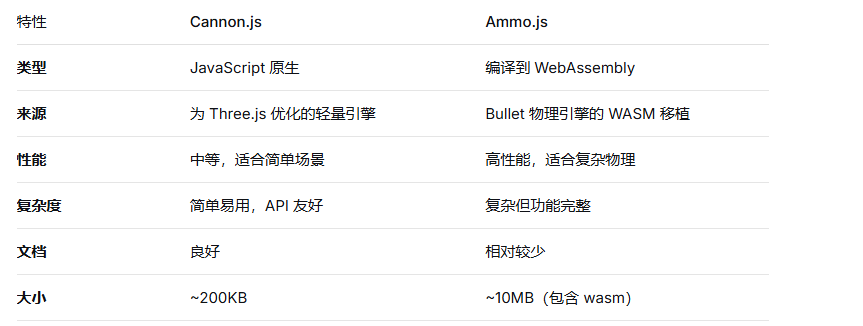
复杂物理模拟:使用 Ammo.js,功能更强大
移动端:考虑使用更轻量的物理引擎
保持物理更新频率稳定(60Hz)
分离渲染帧率和物理更新率
使用射线检测进行交互
实现对象池重用物理对象
javascript
// Cannon.js 调试可视化
import CannonDebugger from 'cannon-es-debugger';

const cannonDebugger = new CannonDebugger(scene, world);
// 在渲染循环中
cannonDebugger.update();
这两种物理引擎都能为 Three.js 项目提供强大的物理能力。根据项目需求和复杂度选择合适的方案,并注意性能优化以获得最佳体验。