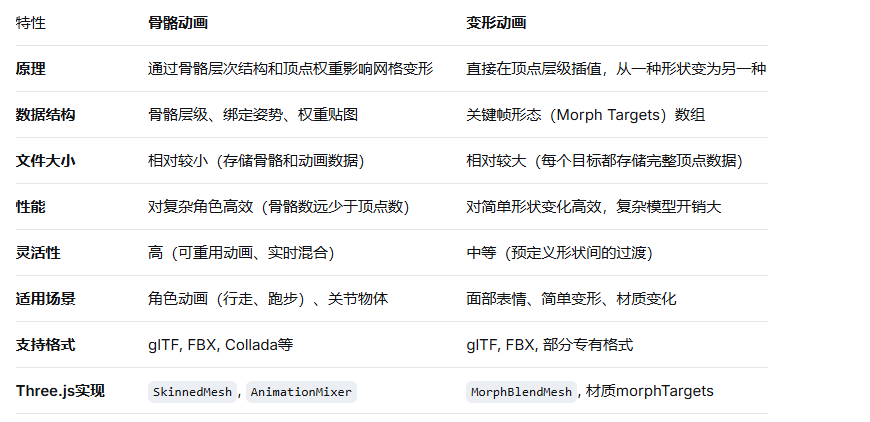
Three.js中的两种主要模型动画技术:骨骼动画和变形动画。这两种动画在3D图形和游戏开发中都极为重要,各有其适用场景和实现原理。
骨骼动画模拟真实生物的骨骼系统:
骨骼层级:骨骼形成树状结构(如:躯干→上臂→前臂→手)
权重绑定:每个顶点被一个或多个骨骼影响,权重决定影响程度
矩阵变换:动画通过改变骨骼的变换矩阵(位置、旋转、缩放)来实现
text
建模 → 绑定骨骼 → 绘制权重 → 制作动画 → 导出javascript
import { GLTFLoader } from 'three/addons/loaders/GLTFLoader.js';

const loader = new GLTFLoader();
loader.load('character.glb', (gltf) => {
    const model = gltf.scene;
    const animations = gltf.animations; // 动画剪辑数组

    // 创建动画混合器
    const mixer = new THREE.AnimationMixer(model);

    // 获取第一个动画剪辑
    const walkAction = mixer.clipAction(animations[0]);
    walkAction.play();

    scene.add(model);

    // 在动画循环中更新
    function animate() {
        const delta = clock.getDelta();
        mixer.update(delta);
        // ... 其他渲染逻辑
    }
});javascript
// 查看网格的骨骼和权重信息
const skinnedMesh = model.getObjectByName('Body');
console.log(skinnedMesh.skeleton); // 骨骼对象
console.log(skinnedMesh.geometry.attributes.skinWeight); // 权重属性
console.log(skinnedMesh.geometry.attributes.skinIndex); // 骨骼索引

// 创建帮助器可视化骨骼
const skeletonHelper = new THREE.SkeletonHelper(skinnedMesh);
scene.add(skeletonHelper);javascript
// 创建多个动画动作
const idleAction = mixer.clipAction(animations[0]);
const walkAction = mixer.clipAction(animations[1]);
const runAction = mixer.clipAction(animations[2]);

// 淡入淡出过渡
idleAction.play();
walkAction.play().fadeIn(0.5); // 0.5秒淡入
idleAction.fadeOut(0.5); // 0.5秒淡出

// 动画混合(如上半身/下半身独立动画)
const upperBodyAction = mixer.clipAction(animations[3]);
const lowerBodyAction = mixer.clipAction(animations[4]);

// 创建自定义混合
upperBodyAction.play();
lowerBodyAction.play();

// 可以设置不同动画的影响权重
mixer.timeScale = 1.0; // 控制整体播放速度变形动画通过存储多个"目标形状"(顶点位置集合),并在它们之间进行插值:
基础形状:模型的原始顶点位置
变形目标:相对于基础形状的顶点偏移量
权重混合:通过控制每个目标的权重值,混合多个目标形状
面部表情(微笑、眨眼、皱眉)
简单物体变形(旗帜飘动、液体晃动)
材质属性动画(通过morphTargets影响材质)
javascript
// 创建带有变形目标的几何体
const geometry = new THREE.BoxGeometry(2, 2, 2);
geometry.morphAttributes.position = [];

// 创建第一个变形目标:拉伸
const target1 = geometry.clone();
for (let i = 0; i < target1.attributes.position.count; i++) {
    const x = target1.attributes.position.getX(i);
    const y = target1.attributes.position.getY(i);
    const z = target1.attributes.position.getZ(i);

    // 应用变形:Y轴拉伸
    target1.attributes.position.setY(i, y * 1.5);
}
geometry.morphAttributes.position[0] = target1.attributes.position;

// 创建第二个变形目标:扭曲
const target2 = geometry.clone();
for (let i = 0; i < target2.attributes.position.count; i++) {
    const x = target2.attributes.position.getX(i);
    const y = target2.attributes.position.getY(i);
    const z = target2.attributes.position.getZ(i);

    // 应用变形:X轴扭曲
    target2.attributes.position.setX(i, x + Math.sin(z) * 0.5);
}
geometry.morphAttributes.position[1] = target2.attributes.position;

// 创建支持变形的材质
const material = new THREE.MeshBasicMaterial({
    color: 0x00ff00,
    morphTargets: true // 启用变形目标
});

// 创建变形网格
const mesh = new THREE.Mesh(geometry, material);
scene.add(mesh);

// 控制变形权重
mesh.morphTargetInfluences = [0, 0]; // 初始权重为0

// 动画循环中更新权重
function animate() {
    const time = Date.now() * 0.001;

    // 第一个目标:周期性拉伸
    mesh.morphTargetInfluences[0] = Math.sin(time) * 0.5 + 0.5;

    // 第二个目标:相位偏移的扭曲
    mesh.morphTargetInfluences[1] = Math.sin(time * 1.5) * 0.5 + 0.5;

    // 更新变形
    mesh.updateMorphTargets();
}javascript
const loader = new GLTFLoader();
loader.load('face_with_expressions.glb', (gltf) => {
    const face = gltf.scene;

    // 启用变形目标
    face.traverse((child) => {
        if (child.isMesh && child.morphTargetInfluences) {
            // 设置初始表情权重
            child.morphTargetInfluences[0] = 0; // 微笑
            child.morphTargetInfluences[1] = 0; // 眨眼
            child.morphTargetInfluences[2] = 0; // 皱眉
        }
    });

    scene.add(face);

    // 动画控制器
    const expressions = {
        smile: 0,
        blink: 1,
        frown: 2
    };

    // 控制表情
    function setExpression(name, intensity) {
        face.traverse((child) => {
            if (child.isMesh && child.morphTargetInfluences) {
                const index = expressions[name];
                if (index !== undefined) {
                    child.morphTargetInfluences[index] = intensity;
                }
            }
        });
    }

    // 使用示例
    setExpression('smile', 0.8); // 微笑
    setExpression('blink', 1.0); // 眨眼
});javascript
// 创建支持变形目标的着色器材质
const vertexShader = `
    varying vec2 vUv;
    varying float vMorphWeight;

    void main() {
        vUv = uv;

        // 计算变形影响(示例:使用第一个变形目标的权重)
        vMorphWeight = morphTargetInfluences[0];

        // 应用变形
        vec3 morphed = position;
        for(int i = 0; i < 8; i++) {
            if(i < 4) {
                morphed += (morphTarget${i} - position) * morphTargetInfluences[i];
            }
        }

        gl_Position = projectionMatrix * modelViewMatrix * vec4(morphed, 1.0);
    }
`;

const fragmentShader = `
    varying vec2 vUv;
    varying float vMorphWeight;

    void main() {
        // 根据变形权重改变颜色
        vec3 color = mix(vec3(1.0, 0.0, 0.0), vec3(0.0, 0.0, 1.0), vMorphWeight);
        gl_FragColor = vec4(color, 1.0);
    }
`;

const customMaterial = new THREE.ShaderMaterial({
    vertexShader: vertexShader,
    fragmentShader: fragmentShader,
    uniforms: {},
    morphTargets: true
});在实际应用中,常常将骨骼动画和变形动画结合使用:
javascript
class CharacterAnimationSystem {
    constructor(character) {
        this.character = character;
        this.mixer = new THREE.AnimationMixer(character);
        this.expressions = {};

        this.init();
    }

    init() {
        // 设置骨骼动画
        this.actions = {
            idle: this.mixer.clipAction(this.findAnimation('Idle')),
            walk: this.mixer.clipAction(this.findAnimation('Walk')),
            run: this.mixer.clipAction(this.findAnimation('Run'))
        };

        // 设置变形动画(表情)
        this.character.traverse((child) => {
            if (child.isMesh && child.morphTargetInfluences) {
                // 假设模型有标准化的表情目标
                this.expressions = {
                    smile: 0,
                    blink: 1,
                    mouthOpen: 2,
                    browRaise: 3
                };
            }
        });

        // 启动默认动画
        this.actions.idle.play();
    }

    // 切换动作
    playAction(name, fadeDuration = 0.3) {
        const newAction = this.actions[name];
        const oldAction = this.currentAction;

        if (newAction !== oldAction) {
            if (oldAction) {
                oldAction.fadeOut(fadeDuration);
            }
            newAction.reset().fadeIn(fadeDuration).play();
            this.currentAction = newAction;
        }
    }

    // 设置表情
    setExpression(name, value, duration = 0.2) {
        this.character.traverse((child) => {
            if (child.isMesh && child.morphTargetInfluences) {
                const index = this.expressions[name];
                if (index !== undefined) {
                    // 创建平滑过渡
                    gsap.to(child.morphTargetInfluences, {
                        [index]: value,
                        duration: duration,
                        ease: "power2.out"
                    });
                }
            }
        });
    }

    // 更新动画
    update(deltaTime) {
        if (this.mixer) {
            this.mixer.update(deltaTime);
        }
    }
}

// 使用示例
const characterSystem = new CharacterAnimationSystem(characterModel);

// 游戏逻辑中控制
characterSystem.playAction('walk');
characterSystem.setExpression('smile', 0.7);
characterSystem.setExpression('blink', 1.0);

// 在动画循环中
function animate() {
    const delta = clock.getDelta();
    characterSystem.update(delta);
}减少骨骼数量:在满足需求的前提下使用最少的骨骼
优化权重:每个顶点最多受4根骨骼影响(GPU优化)
使用GPU蒙皮:确保启用 mesh.skeleton.useVertexTexture = true;
动画LOD:根据距离简化动画计算
限制目标数量:通常不超过8-16个目标
使用局部变形:只对需要变形的区域创建目标
压缩数据:使用 Float32Array 并考虑数据压缩
分层加载:先加载基础模型,再按需加载变形目标
javascript
// 1. 使用共享的AnimationMixer处理多个模型
const sharedMixer = new THREE.AnimationMixer(scene);

// 2. 批量更新变形目标
function updateAllMorphTargets() {
    scene.traverse((obj) => {
        if (obj.isMesh && obj.morphTargetInfluences) {
            obj.updateMorphTargets();
        }
    });
}

// 3. 使用InstancedMesh处理相同动画的多个实例
const instancedMesh = new THREE.InstancedMesh(geometry, material, count);
// 为每个实例单独设置动画状态...骨骼动画:使用glTF导出器,确保勾选"动画"选项
变形动画:使用Shape Keys创建变形,glTF导出器会自动转换
javascript
// 加载后检查模型动画信息
loader.load('model.glb', (gltf) => {
    console.log('Animations:', gltf.animations.length);
    gltf.animations.forEach((clip, i) => {
        console.log(`Clip ${i}:`, clip.name, clip.duration, 'seconds');
    });

    // 检查变形目标
    gltf.scene.traverse((child) => {
        if (child.isMesh) {
            console.log('Morph targets:', child.morphTargetDictionary);
            console.log('Morph influences:', child.morphTargetInfluences);
        }
    });
});选择骨骼动画当:
需要复杂的角色动画
动画需要重用或混合
追求最佳性能(对复杂模型)
需要物理交互或逆向运动学(IK)
选择变形动画当:
制作面部表情
简单的形状变化
材质属性需要随形状变化
需要精确控制每个顶点的运动
结合使用:
角色身体用骨骼动画
面部表情用变形动画
特殊效果(如肌肉膨胀)用变形目标增强
实际项目中,通常使用专业3D软件(如Blender、Maya)创建动画,然后导出为glTF格式,在Three.js中使用统一的AnimationMixer系统进行播放和控制。